Searching the Shopify App Store for “wishlist” turns up dozens of results. Most claim to be free. Some are. Many bury paid features behind misleading “free” labels. Others are free but stripped down to the point of being useless.
This guide skips the brand comparisons and gives you the nine things to actually check. If a wishlist app passes all nine, it’ll drive sales. If it misses two or more, it won’t matter how many five-star reviews it has.
Quick answer: A free Shopify wishlist app is worth installing only if it covers the basics:
- Variant-level saving (size, color)
- Guest wishlists with no signup
- Automated email reminders for back in stock, price drop, and abandonment
- Theme app blocks, no code required
- At least one email-tool integration
Magic Wishlist ships all nine of the criteria below at no cost. Most other “free” wishlist apps fail on three or more.
The 9 features that separate working wishlists from dead ones
A wishlist app is a system. The system either works end-to-end or breaks somewhere. Here’s the checklist that matters.
1. Variant-level saving (size, color, style)
The most common failure point. Cheap or older wishlist apps only track at the product level. A shopper saves “Linen Jacket”, and then gets back-in-stock alerts every time any size of that jacket restocks. Most of those alerts are wrong.
Variant-level saving means the app remembers exactly which size, color, or style the shopper picked. Alerts only fire on that specific variant.
Why it matters: Trust. One bad alert (“we’re back!” for a size you don’t wear) and the shopper unsubscribes. Variant accuracy decides whether your recovery emails build or destroy trust.
Magic Wishlist: Variants tracked by default.
2. Guest wishlists (no signup required)
If your wishlist app forces account creation before saving items, save volume drops 70–80%. Most shoppers won’t sign up to save a maybe-purchase.
Guest wishlists store wishlist items in a first-party cookie. The list persists between visits. When the shopper eventually signs in or checks out, their guest wishlist merges into their customer wishlists automatically. No data lost.
Why it matters: Volume. The shoppers who refuse to sign up are the largest pool. A wishlist that works only for logged-in shoppers reaches a fraction of your traffic.
Magic Wishlist: Guest wishlists on by default. Auto-merge on checkout.
3. Automated emails (built-in, no extra app)
A wishlist without automated emails is just a save button. The emails are how saves turn into sales.
Look for four built-in email types:
- Abandonment reminder: sent X hours after a save with no purchase
- Price drop alert: fires when a saved item’s price decreases
- Low stock alert: fires when a saved item drops below a threshold
- Back in stock alert: fires when a saved item returns to inventory
If the wishlist app requires you to bring your own email tool to send these, it’s incomplete. Free apps that include the four built-in emails are rare; treat finding one as the main filter.
Magic Wishlist: All four emails built in, editable, no per-send fee.
4. Per-shopper personal discount codes
The abandonment reminder converts 2–3× better when it includes a unique discount code per shopper (like GRAB-SARAH10) versus a generic store-wide code.
Most apps don’t do this. The few that do often charge for it. Verify before installing.
Why it matters: A unique code can’t be screenshotted and shared on Reddit. Generic codes get abused; personal codes don’t. Personal codes also build customer loyalty without leaking margin to bargain hunters.
Magic Wishlist: Auto-generates a unique code per shopper for the abandonment reminder, free.
5. Share wishlists via link, email, WhatsApp, and social
Sharing is the under-marketed superpower of wishlists. When shoppers share wishlists with a friend, they send a personalized landing page to someone who is already considering buying for them. That’s some of the highest-intent traffic you can get, and it costs nothing.
The share methods that actually drive traffic:
- Direct link (universal)
- Email (with pre-filled body)
- WhatsApp (especially strong outside the US)
- Facebook + Twitter / X (situational)
Anything less than four sharing channels is light on this feature.
Why it matters: Free organic traffic. Stores that enable sharing see 5–10% of December traffic come from wishlist shares.
Magic Wishlist: Five sharing channels on by default.
6. App block compatibility (no code, works with Online Store 2.0 themes)
Older wishlist apps require theme code edits, installing custom Liquid sections and JavaScript snippets. This breaks every time you update your theme.
Modern wishlist apps use Shopify’s app block system. The merchant toggles the embed on in the theme editor; nothing touches the theme’s actual code. Updates don’t break anything.
If a wishlist app’s setup includes copy-pasting code into your theme files, that’s a red flag. Online Store 2.0 has been the standard since 2021.
Why it matters: Long-term maintenance. App-block apps stay working forever. Code-edit apps break on every theme update.
Magic Wishlist: App blocks only. No theme code. Works with Dawn, Sense, Craft, Refresh, and every Shopify Theme Store theme.
7. Email tool integrations (at least Klaviyo)
A wishlist that doesn’t push events to Klaviyo, Omnisend, Mailchimp, or Shopify Flow leaves 80% of its value on the table. The built-in emails handle basics, but real growth comes from feeding wishlist signals into the rest of your stack.
Minimum acceptable: Klaviyo + Shopify Flow integrations. Better: 5+ integrations covering email, ads, and analytics.
Why it matters: Compounding leverage. Wishlist data is most valuable when it triggers your existing automations, not just the app’s built-in emails.
Magic Wishlist: Nine integrations including Klaviyo, Omnisend, Mailchimp, Yotpo, Meta Ads, Google Analytics 4, Shopify Flow, n8n, and Make. All free. See the full list in our Klaviyo integration guide.
8. Branding controls (colors, icon style, custom CSS)
The wishlist button needs to match your brand. The wishlist drawer needs to feel native. The recovery emails need to look like they came from your store.
Minimum branding controls:
- Primary color
- Icon style (filled, outline, or custom)
- Display mode (drawer, modal, or full page)
- Editable email templates
Bonus: full custom CSS for pixel-perfect control.
Why it matters: Wishlists that look bolted-on get ignored. Native-feeling wishlists get used.
Magic Wishlist: All branding controls free, including custom CSS and live preview.
9. Analytics with revenue attribution
The metric that matters is revenue from shoppers who saved an item, not number of saves. A wishlist app that only reports save counts isn’t telling you whether the channel works.
Required analytics:
- Saves over time
- Top saved products
- Recovery email open / click / conversion rates
- Revenue attributed to wishlist sessions (including guest checkouts)
If revenue attribution is locked behind a paid tier, the free version is incomplete.
Why it matters: You can’t optimize what you can’t measure. Without revenue attribution, the wishlist channel feels like a black box.
Magic Wishlist: All analytics in the free version, including guest-checkout attribution.
How to spot fake “free” wishlist apps
Three patterns that signal a wishlist app’s “free” tier is a trap.
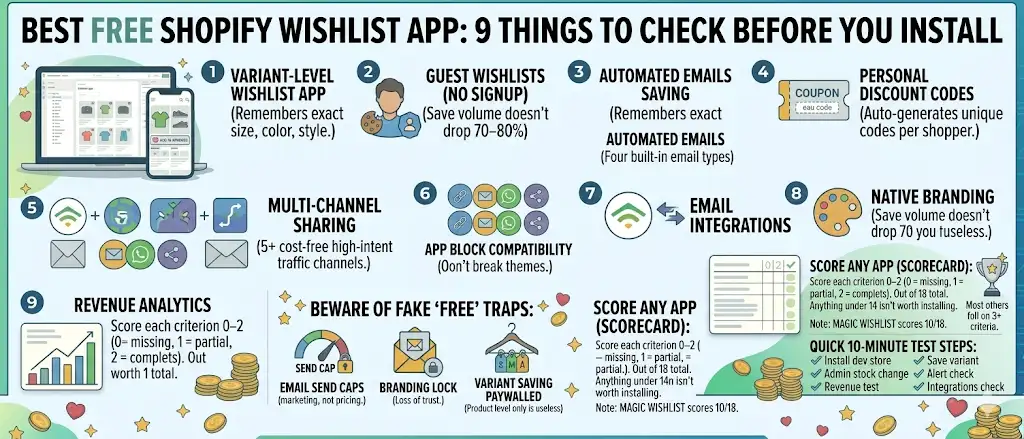
Trap 1: Email send caps. “Free up to 100 emails/month.” Sounds reasonable until your store hits 200 saves a week and the cap gets hit on day 4.
Trap 2: Branding lock. “Free with our brand on every email.” Your recovery emails go out with the wishlist app’s logo, not yours. The shopper trusts the app, not your store.
Trap 3: Variant saving paywalled. “Free for product-level saving. Variant saving is Premium.” The most important feature is on the paid tier.
A genuinely free plan has none of these caps. If you see any of the three, the “free” label is marketing, not pricing.
Comparison: 9 criteria, scored
A scoring template you can use on any wishlist app. Score each criterion 0–2 (0 = missing, 1 = partial, 2 = complete). Out of 18 total. Anything under 14 isn’t worth installing.
| # | Criterion | Score |
|---|---|---|
| 1 | Variant-level saving | _/2 |
| 2 | Guest wishlists | _/2 |
| 3 | Built-in recovery emails (4 types) | _/2 |
| 4 | Personal discount codes | _/2 |
| 5 | Wishlist sharing (5+ channels) | _/2 |
| 6 | App block compatibility | _/2 |
| 7 | Email tool integrations | _/2 |
| 8 | Branding controls | _/2 |
| 9 | Revenue attribution analytics | _/2 |
| Total | _/18 |
For reference, Magic Wishlist scores 18/18, every criterion complete in the free tier. We built it specifically against this checklist. Most other free wishlist apps in the Shopify App Store score 8–13 on the same criteria. The gap is usually variant saving, integrations, and revenue attribution.
How to evaluate any wishlist app in 10 minutes
A practical way to test before committing:
- Install the app on a development store (or an unused theme).
- Save a product variant by picking a specific size or color from a guest tab.
- Switch the saved variant to sold out in your admin.
- Restock it five minutes later.
- Check whether the alert email fires for the exact variant.
- Check whether the email is on your domain or the app’s.
- Check whether revenue attribution shows up in analytics if you complete a test purchase.
- Open the integrations page and count one-click integrations. If it’s under five, the app is incomplete.
- Try the wishlist share flow and confirm at least four channels work.
- Verify the heart button shows on collection grid product cards, not just on product pages.
Ten minutes of testing tells you what reviews can’t.
Pick the wishlist that scores 18/18
There’s only one criterion that matters more than the nine above: does the wishlist convert saved items into sales? That’s a function of the nine. Get them all and you boost sales without spending more on paid traffic.
Install Magic Wishlist free. Full 18/18 in the free tier, no upsell.