If you’re researching how to add a Shopify wishlist without an app, you’ve probably hit one of two motivations: you don’t want to install another app, or you assume DIY will be cheaper. Both are reasonable. Both are usually wrong once you do the math.
This post walks through the actual DIY approach honestly, covers the limits, and explains when it’s worth installing a free wishlist app instead. We make a free wishlist app (Magic Wishlist), so we have a horse in this race, but the analysis below is the same one we’d give a friend.
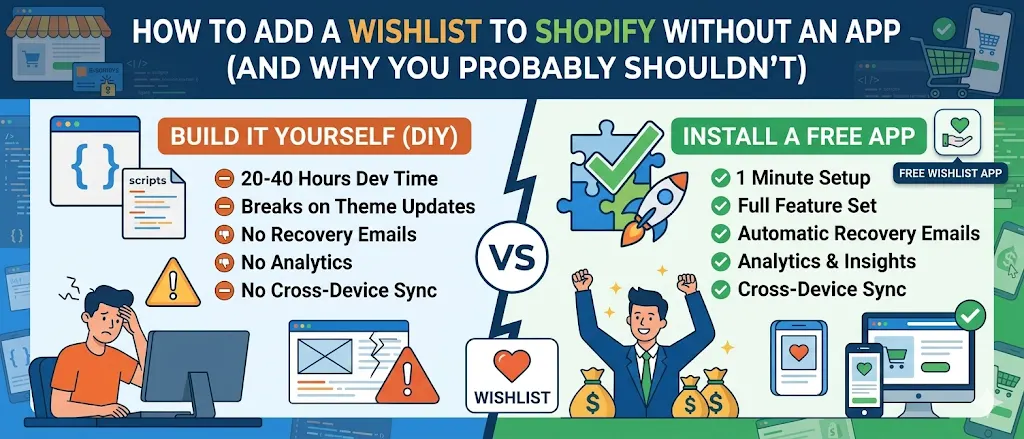
Quick answer: You can add a basic Shopify wishlist without an app by writing custom Liquid sections and JavaScript that store items in browser localStorage. It costs 20–40 hours of developer time, breaks on theme updates, has no recovery emails, no analytics, and no cross-device sync. A free wishlist app gives you all of that in 1 minute for $0. The DIY route only makes sense in narrow cases (in-house developer capacity, heavily customized themes, or unusual B2B requirements).
What is a Shopify wishlist without an app?
A Shopify wishlist without an app is wishlist functionality you build into your store using custom Liquid sections, JavaScript, and browser localStorage, instead of installing a third-party wishlist app from the Shopify App Store. Shoppers can save favorite products and view them on a custom wishlist page, but the experience stops there.
A custom-coded wishlist is frontend-only. Without a backend database, you don’t get the features that make wishlists drive customer retention: automated recovery emails, variant-level back in stock alerts, cross-device sync, or analytics. Those features all require something to listen for events server-side, which is what wishlist apps do.
Most Shopify themes, including Dawn, Sense, Craft, Refresh, Studio, and Origin, don’t ship with native wishlist functionality, so a custom wishlist means custom Shopify development on top of the theme.
What “without an app” actually means
Shopify doesn’t ship a native wishlist feature. There’s no setting in the admin labeled “wishlist.” So “adding a Shopify wishlist without an app” means one of these:
- DIY code in your theme. Write Liquid sections, JavaScript, and a custom
/pages/wishlistpage that store saved items in browser localStorage. - Hire a Shopify developer to do the same DIY work for you.
- Use a feature that’s close enough (like a draft cart or customer account saved items) and pretend it’s a wishlist.
We’ll cover all three.
Option 1: Build it yourself in theme code
This is the path most people mean when they say “without an app.”
What you’d build:
- A heart button (Liquid section) added to the product card template and product page
- JavaScript that listens for clicks, reads and writes a
localStoragearray of product IDs and variant IDs - A custom Liquid page (
/pages/wishlist) that reads the localStorage array and renders the saved products - A small badge counter showing how many items are saved
- Optional: a way to share the wishlist (URL with the IDs encoded)
What you’d skip (because it requires a backend):
- Recovery emails (any kind)
- Cross-device sync, a save on phone won’t show on desktop
- Guest-to-account merge, when a guest signs in, their saved items disappear unless you hand-roll the migration
- Variant-level back in stock alerts
- Price drop alerts
- Analytics on save volume or wishlist-attributed revenue
- Admin controls, you can’t easily see top saved items in your admin
Time investment: 20–40 hours for a Shopify developer to build it cleanly. Less if you have working examples to copy; more if you want it polished.
Cost: $2,000–$8,000 at typical agency rates for the initial build. Plus ongoing maintenance every time the theme updates.
Maintenance burden: the killer. Custom theme code breaks on theme upgrades. Every time Shopify pushes a new theme version, every time a designer touches the theme, every time you switch themes seasonally, the wishlist code needs review and often patching. Most stores that go DIY abandon the wishlist within 6–12 months because of this.
Option 2: Hire a developer to build the same thing
Same DIY approach but you’re outsourcing the build. Cost: $2,000–$8,000 for the initial build. Ongoing: $50–$200/month for theme updates and bug fixes.
This is sometimes the right call if:
- You have a heavily customized Shopify theme outside what off-the-shelf apps support
- You have specific requirements that no wishlist app covers (rare)
- You’re building a B2B store with unusual workflows
In every other case, a free wishlist app is faster, more capable, and cheaper.
Option 3: Use a “wishlist substitute”
A few patterns merchants try as workarounds. None of them are great.
Draft carts. Tell customers to add items to cart but not check out. Shopify keeps the cart for 14 days. Why this fails: the customer can only have one cart at a time, the cart isn’t a “wishlist” in their mental model, and the moment they actually want to buy something else they’ll clear the cart.
Customer account saves. Some Shopify themes have a “save for later” feature inside customer accounts. Why this fails: requires a customer account (kills 70–80% of save volume), no recovery emails, no alerts, no variant tracking.
Email a list. Some merchants suggest customers email themselves the products they like. Why this fails: nobody does it. Self-emailing is a workflow tax that breaks the moment a shopper has to actually do it.
None of the substitutes give you what a real wishlist does: tracked saves with automated follow-up that converts.
Shopify wishlist without an app vs wishlist app
A side-by-side, no spin.
| Dimension | Custom code (no app) | Wishlist app (free, e.g. Magic Wishlist) |
|---|---|---|
| Setup cost | 20–40 dev hours, or $2,000–$8,000 outsourced | $0, install in 1 minute |
| Ongoing cost | $50–$200/mo for theme update maintenance | $0/mo, forever |
| Recovery emails | None (requires a backend) | 4 types built in: abandonment, price drop, back in stock, low stock |
| Variant-level alerts | Not possible | Per-variant precision (size, color, style) |
| Cross-device sync | localStorage only, phone saves don’t appear on desktop | Yes, persists across devices |
| Guest-to-account merge | Manual migration required | Automatic on sign-in |
| Analytics | None | Top saved products, recovery rates, attributed revenue |
| Theme update safety | Breaks on theme updates | Online Store 2.0 app blocks, isolated from theme code |
| Integrations (Klaviyo, GA4, Meta Ads) | Build each yourself | One-click connect, included free |
| Wishlist sharing | URL-encoded IDs (basic) | Link, email, WhatsApp, Facebook, X (5 channels) |
| Maintenance burden | Ongoing, you own every bug | None, app handles updates |
For 95% of Shopify stores, a free wishlist app delivers more wishlist functionality, faster, at lower total cost than custom code. For our full breakdown of what makes a good wishlist app, see the 9-point checklist.
The honest cost comparison
Side-by-side over 12 months for a typical Shopify store doing $20K/month in revenue:
| Approach | Setup cost | Ongoing cost | Time to set up | Features |
|---|---|---|---|---|
| DIY in-theme code | 20–40 dev hours | Theme update bugs, ~$50–$200/mo if outsourced | 1–2 weeks | Save + view only |
| Hired developer | $2,000–$8,000 | $50–$200/mo maintenance | 2–4 weeks | Save + view only |
| Paid wishlist app | $0 install | $15–$100/mo | 5 min | Full feature set |
| Magic Wishlist (free app) | $0 install | $0/mo, forever | 5 min | Full feature set |
For most stores, the free app is the cheapest and the most capable option. The DIY appeal is intuitive but the math doesn’t work out.
When DIY might actually be the right call
To be fair, here are the narrow cases where building it yourself makes sense:
- You have a developer on staff with capacity, and you specifically want full control over the wishlist UX (uncommon design requirements, custom interactions).
- You’re on Shopify Plus with a heavily customized theme that doesn’t support app blocks cleanly, and adding any app would require significant integration work anyway.
- You have a unique B2B requirement like account-tier-specific wishlists, multi-list-per-customer workflows, or B2B approval flows that no wishlist app covers.
- You’re learning to code and want a project. (Honest answer. A wishlist is a decent intermediate Shopify development project.)
If any of those apply, the DIY guide below gets you started. If none apply, install a free wishlist app and skip the headache.
A barebones DIY wishlist (if you really want to)
If you want to try the DIY approach as a learning exercise or because one of the cases above applies, here’s the simplest possible version.
Step 1: Add a heart button to the product page. In your theme, edit the product template (sections/main-product.liquid in Dawn) and add:
<button class="wishlist-btn" data-product-id="{{ product.id }}" data-variant-id="{{ product.selected_or_first_available_variant.id }}">
  ♡ Save
</button>
Step 2: Add JavaScript to handle clicks. In assets/wishlist.js:
document.querySelectorAll('.wishlist-btn').forEach(btn => {
  btn.addEventListener('click', () => {
    const variantId = btn.dataset.variantId;
    let wishlist = JSON.parse(localStorage.getItem('wishlist') || '[]');
    if (!wishlist.includes(variantId)) {
      wishlist.push(variantId);
      localStorage.setItem('wishlist', JSON.stringify(wishlist));
      btn.textContent = '♥ Saved';
    }
  });
});
Include it in your theme.liquid: <script src="{{ 'wishlist.js' | asset_url }}" defer></script>
Step 3: Create a wishlist page. In Shopify Admin → Online Store → Pages, create a page called “Wishlist” with the URL /pages/wishlist. Assign it a custom template (page.wishlist.liquid) that uses Shopify’s Storefront API to fetch products by the variant IDs stored in localStorage.
This is where the work explodes. Fetching products by variant ID requires the Storefront API, which needs an API token, which needs a private app, which means you’re already 80% of the way to managing an app yourself.
If you’re nodding along at this point, you’re about to confirm what most merchants discover: the cost of going DIY is mostly hidden until you start building.
Just install a free wishlist app
For 95% of Shopify stores, installing Magic Wishlist gets you a complete working wishlist in 1 minute, with all the features the DIY approach skips, recovery emails, variant alerts, analytics, cross-device sync, at no cost.
The reason we built Magic Wishlist as fully free: most merchants don’t have the budget or appetite for paid wishlist apps, and the DIY alternative is much more expensive than it looks. Removing the cost barrier and the engineering cost lets stores actually run wishlist recovery, which most merchants weren’t doing before.
For deeper guides on getting more from wishlist functionality once it’s installed:
- How to add a wishlist to your Shopify store, the full Magic Wishlist install walkthrough
- Add a wishlist to Shopify Dawn theme, Dawn-specific install steps
- Shopify wishlist marketing: 10 strategies, turn saves into sales
- Shopify back in stock notifications, free, the recovery email flow
- Klaviyo + Shopify wishlist integration, advanced flows in Klaviyo
The realistic answer
You can add a Shopify wishlist without an app. It just doesn’t make economic sense for most stores. The DIY approach costs more in developer time than a paid wishlist app costs per year, lacks the recovery email automation that makes wishlists revenue-generating, and breaks on theme updates.
The right choice for most Shopify stores is a free wishlist app. The right choice for narrow edge cases (heavy theme customization, in-house developer capacity, unusual B2B workflows) is custom code. The wrong choice for almost everyone is paying for a wishlist app when free options match feature-for-feature.
Install Magic Wishlist free. One minute. Free forever. Every wishlist functionality feature included.