A wishlist by itself doesn’t drive sales. The setup is easy. The marketing strategy around it decides whether saved favorites turn into revenue or sit dormant.
This guide covers ten Shopify wishlist marketing strategies that consistently move the needle, the customer segmentation and automation workflows that scale them, the common mistakes to avoid, and how to measure ROI. Each strategy is small. They stack. Run them together and a wishlist becomes one of the highest-ROI channels on your store, for free.
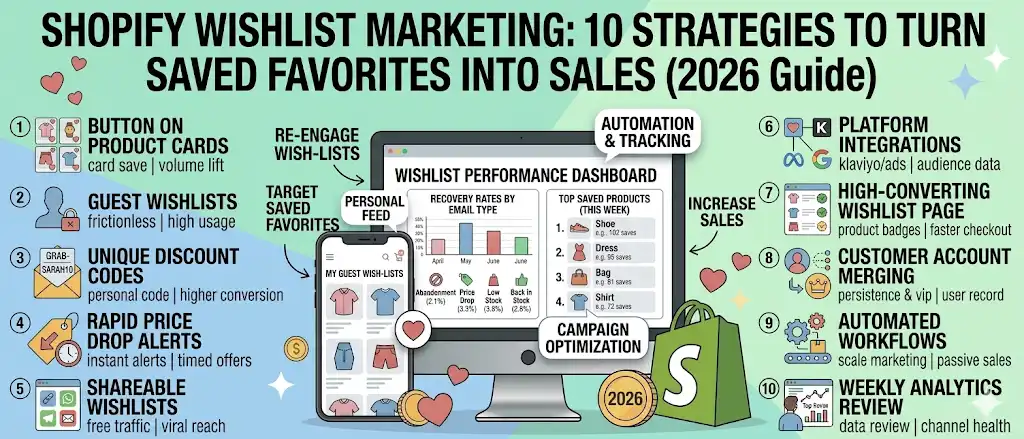
Quick answer: Shopify wishlist marketing turns saved favorites into sales using 10 strategies: (1) put the wishlist button on product cards, not just product pages; (2) allow guest wishlists without forcing customer accounts; (3) personalize recovery emails with unique discount codes; (4) fire price drop alerts within minutes; (5) make the wishlist page shareable for organic traffic; (6) connect wishlist data to Klaviyo and ad platforms; (7) build a high-conversion wishlist page; (8) use customer accounts for personalized marketing; (9) automate the wishlist-to-purchase workflow; (10) review analytics weekly. Most Shopify stores see 3–8% of total revenue attributed to wishlist marketing within 60 days.
What is Shopify wishlist marketing?
Shopify wishlist marketing is the practice of using saved favorites as a marketing channel. When a shopper clicks the wishlist button on a product card or product page, they’re telling your store, “I want this, but not yet.” That signal is more valuable than a generic email signup and earlier in the funnel than an add to cart event.
Shopify wishlist marketing covers everything you do with that signal: the wishlist button placement, the wishlist page experience, the automated recovery emails, the customer segmentation in Klaviyo, the retargeting audiences in Meta Ads, and the analytics that tell you what’s working. Done well, it turns passive saves into measurable revenue.
Why wishlist marketing works for ecommerce stores
A wishlist is one of the rare ecommerce channels where the shopper opts in while expressing intent on a specific product. Most marketing channels are either intent without consent (retargeting cookies) or consent without intent (a generic email signup).
Wishlists have both. The shopper raises their hand and says, “I’m interested in this exact product, in this exact size and color.” That signal is the foundation of every strategy that follows.
Three reasons wishlist marketing outperforms other retention channels:
- Earlier funnel signal. A wishlist save happens before add to cart, before checkout, before purchase. You reach the shopper at the consideration stage when intent is fresh.
- Per-variant precision. A good wishlist app tracks the exact variant saved, size medium, color sand, not just the parent product. That precision feeds back-in-stock alerts and price drop emails that actually convert.
- Zero-friction opt-in. A guest wishlist requires no signup. The shopper saves favorites in one click. That removes the biggest friction point in traditional email capture.
How wishlist data reveals purchase intent
Wishlist data is the cleanest purchase intent signal in ecommerce. Every save links a specific shopper (or anonymous session) to a specific product variant at a specific moment.
That data answers four questions other channels can’t:
| Question | What wishlist data tells you |
|---|---|
| Which products do shoppers consider but not buy? | The top saved-but-not-purchased list |
| What price point are shoppers waiting for? | Saves followed by no purchase, segmented by price tier |
| Which variants matter most? | Per-variant save counts (e.g., size XL outsells size S in saves 4:1) |
| What’s the right restock priority? | Saves on out-of-stock variants |
Each row is a marketing decision waiting to be made. A wishlist app that doesn’t surface this is leaving revenue on the table.
10 Shopify wishlist marketing strategies that increase sales
Strategy 1: Place the wishlist button on product cards, not just product pages
The single biggest predictor of save volume is wishlist button placement. If the heart only appears on individual product pages, shoppers must click into each product to save it. Most won’t bother.
Move the wishlist button to the product card, the small product preview on collection grids, search results, and category pages. Now a shopper can browse 20 items, save 4 of them, and never click into a single product page.
Save volume typically doubles or triples with this single change. In Magic Wishlist, the product card wishlist button is on by default. If your current wishlist app doesn’t put it there automatically, that’s the first setting to fix.
Strategy 2: Allow guest wishlists with no customer account required
Forcing account creation kills wishlist usage. Asking a shopper to sign up before they can save favorites is asking them to commit before they’re ready.
Guest wishlists let any visitor save items with zero friction. The wishlist persists between visits via a first-party cookie. When the shopper later signs in or creates a customer account, the guest wishlist merges into their customer record automatically. Nothing gets lost.
The data on this is consistent across stores: guest wishlists capture 4–6× more saves than account-required wishlists. The merge-on-signin pattern means you don’t lose attribution either, you can still track which saved items led to which orders.
Magic Wishlist defaults to guest wishlists on. If your wishlist app doesn’t, switch to a wishlist app that does.
Strategy 3: Personalize recovery emails with unique discount codes
The default abandonment reminder template includes a generic CTA (“come back and shop”). Stores that swap the generic CTA for a personal discount code see 2–3× higher conversion on the email.
What works:
- Per-shopper unique code. Like
GRAB-SARAH10. Personal, not transferable, can’t be screenshotted and shared on Reddit. - First-name personalization in subject and body. “Hey Sarah, here’s GRAB-SARAH10” outperforms “Here’s a code” by 8–12% open rate.
- Modest discount (10–15%). The code lifts conversion. The discount doesn’t need to be aggressive, the personalization is most of the lift.
Magic Wishlist auto-generates a unique code per shopper for the abandonment reminder by default. No setup beyond turning the email on.
Strategy 4: Fire price drop alerts within minutes
Price drop alerts have the highest conversion rate of any wishlist recovery email. The trigger is the offer. But the conversion rate decays fast. Every hour between price change and email costs you sales.
Most wishlist apps poll for price changes daily. Magic Wishlist polls every few minutes. The difference matters, a shopper who saved an item wants to know the moment it drops, not the next day when they’ve forgotten.
Two practical implications:
- Don’t drop prices manually at end-of-day. The alert fires fastest if the price change happens during peak-traffic hours (10 AM to 8 PM in your primary market timezone).
- Avoid micro-discounts. A 50¢ drop fires the email but doesn’t move shoppers. Set a threshold so only meaningful drops trigger alerts. Magic Wishlist’s default is 5%, and anything smaller is suppressed.
Strategy 5: Make wishlists shareable for free organic traffic
Most wishlist apps treat sharing as an afterthought. It’s actually one of the strongest free traffic levers a store has.
A shopper who shares their wishlist page sends a personalized landing page (your store, with their favorite products pre-loaded) to a friend or family member who is already considering buying for them. That’s the highest-quality traffic in ecommerce. It costs nothing to fire.
Shareable formats that convert:
- Direct link, shopper sends a URL via text or email
- WhatsApp, especially strong in non-US markets
- Email, with pre-filled subject and body
- Social (Facebook, Twitter), for public-facing product types
Use cases where wishlist sharing reliably drives traffic:
- Birthdays, shopper shares their wishlist page with their partner or family
- Wedding registry alternatives, for stores that don’t run formal registries
- Holiday gifting, December traffic from wishlist shares regularly hits 5–10% of total traffic for fashion and gift stores
Magic Wishlist supports all five share channels with one setting. Turn it on once, and shoppers handle the rest.
Strategy 6: Connect wishlist data to Klaviyo and ad platforms
A wishlist app that doesn’t integrate is missing 80% of its marketing potential. Wishlist events should flow into:
- Email tools (Klaviyo, Omnisend, Mailchimp) for advanced segmentation and flows beyond the built-in templates
- Ad platforms (Meta Ads, Google Ads) for retargeting based on saved favorites
- Analytics (GA4) for full-funnel attribution
- Workflow automation (Shopify Flow, n8n, Make) for custom logic
The strongest combo for most Shopify stores is wishlist + Klaviyo. Wishlist captures the intent signal; Klaviyo runs sophisticated flows on it. The full setup is in our Klaviyo wishlist integration guide.
For Meta Ads, the wishlist signal becomes a custom audience: “shoppers who saved any product in the last 30 days.” Run a retargeting ad to that audience with the saved product image. Cost per acquisition typically drops 30–50% versus broad retargeting because the audience is far higher intent.
Magic Wishlist supports nine native one-click integrations. Pick the two or three you actually use and connect them.
Strategy 7: Build a high-conversion wishlist page
The wishlist page itself is a conversion surface, not a storage closet. A well-designed wishlist page lifts the conversion rate of return visits by 20–40%.
Wishlist page elements that work:
- Product image, name, variant, and live price, with strikethrough if the price has dropped since the save
- Stock status badges, low stock, back in stock, sale (these are the top-converting interactions)
- One-click add to cart from the wishlist page itself
- One-click remove so shoppers can clean up without friction
- Share button, every share is potential organic traffic
- Recommendations, three or four “you might also like” items based on the saved categories
- Sort and filter, once a shopper saves more than 12 favorites, they need grouping
Skip:
- Heavy CTAs above the product list (“Buy now or lose it!” feels desperate)
- Modal popups on the wishlist page itself (shoppers came here to look at their saves, not see more popups)
Strategy 8: Use customer accounts for personalized marketing
Customer accounts are the bridge between anonymous saves and lifetime value. When a guest wishlist merges into a customer account, you unlock:
- Cross-device persistence. The shopper saves favorites on mobile during commute, finishes checkout on desktop at home.
- Segmentation by saved categories. Klaviyo can segment customers by “saved any product in Dresses” or “saved any product over $200”, far more powerful than generic email segments.
- Lifecycle triggers. New customer + first wishlist save = welcome flow with their saved items featured. Returning customer + no wishlist activity in 30 days = winback flow.
- VIP signals. Customers with 10+ saved favorites are warmer than customers with one purchase. Use that for early access, loyalty pricing, or beta product launches.
The customer account is also where the wishlist page lives natively. Make sure the wishlist link is prominent in the customer account navigation, most stores bury it.
Strategy 9: Automate the wishlist-to-purchase workflow
Manual wishlist marketing doesn’t scale. Automation does. Build these workflows once, let them run forever:
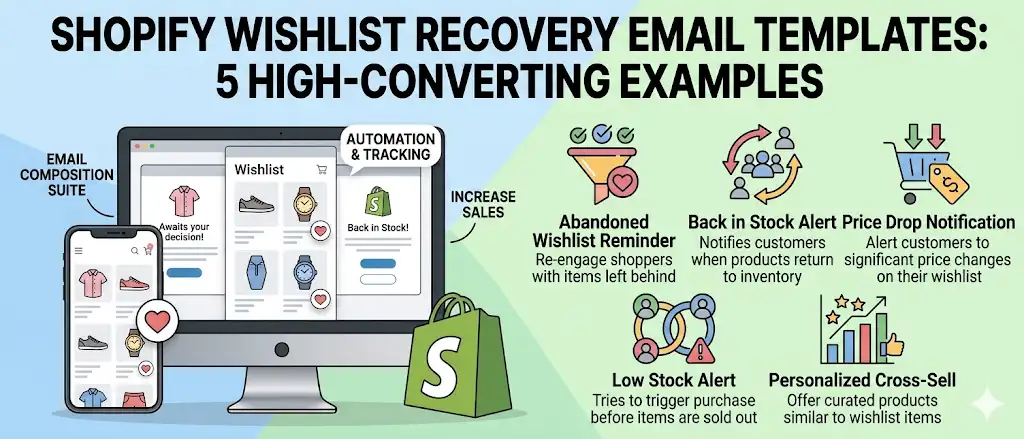
- Save → 24h abandonment reminder. Default email, personalized with first name and unique discount code.
- Saved item drops in price → instant alert. Within minutes, not next day.
- Saved item goes out of stock → back in stock alert when restocked. On the exact variant.
- Saved item drops below 5 units → low stock alert. Drives urgency on items the shopper already wants.
- Shopper saves any item → Klaviyo “Wishlist Intent” flow. Day 1: thank you for saving. Day 3: feature similar items. Day 7: testimonial showing other shoppers who bought after saving.
- Shopper saves 3+ items in one category → category-specific flow. Higher intent than a single save.
- Wishlist Meta Ads custom audience refresh weekly. Auto-syncs new savers to retargeting audiences.
Each workflow is set up once. Magic Wishlist handles 1–4 natively. Klaviyo handles 5 and 6. Meta Ads pixel + Magic Wishlist’s integration handles 7.
Strategy 10: Review the analytics weekly and adjust
A wishlist set up and forgotten degrades. Two metrics matter most:
Top saved products. Update weekly. The list tells you what to feature on the homepage, what to run ads on, what to restock first, and what to discount last (because it sells without help). For most stores, the top saved products list disagrees with the top selling list, the wishlist is the leading indicator.
Recovery rate by email type. Track conversion rate on each of the four wishlist recovery emails (abandonment, price drop, low stock, back in stock). If one underperforms, fix the template, the timing, or the threshold. Magic Wishlist’s analytics dashboard surfaces this in a single view.
A weekly 15-minute review keeps the channel healthy. A quarterly review lets it drift. Most stores that abandon wishlist marketing do so because they stopped checking, not because the channel stopped working.
Wishlist marketing vs abandoned cart marketing
These are different channels and they don’t overlap. Run both.
| Dimension | Wishlist marketing | Abandoned cart marketing |
|---|---|---|
| Funnel stage | Consideration (pre-cart) | Checkout (post-cart) |
| Trigger | Shopper clicks save | Shopper reaches checkout, doesn’t pay |
| Intent level | Soft (browsing-with-intent) | Hard (ready-to-buy, blocked) |
| Typical recovery rate | 3–8% of total revenue | ~10% of cart abandoners |
| Best message | ”Your favorite is on sale" | "You forgot something” |
| Audience size | Larger (more shoppers save than reach cart) | Smaller, higher intent |
| Required setup | Wishlist app, recovery emails | Shopify’s built-in cart abandonment + email tool |
The full comparison is in our Abandoned Cart vs Wishlist Recovery guide.
Using wishlist data for customer segmentation
Wishlist data unlocks customer segments that aren’t available from purchase data alone. The most useful segments to build in Klaviyo or your email tool:
- High-intent browsers. Shoppers with 3+ saved favorites and zero purchases. Send a discount-led winback flow.
- Category enthusiasts. Shoppers who saved 5+ products in one category (Dresses, Skincare, Lighting). Send category-specific lookbooks and lookalike-product flows.
- Price-sensitive savers. Shoppers whose saves are concentrated in items they haven’t bought. Trigger a price drop campaign across the cluster.
- Variant-specific waiters. Shoppers waiting for a specific variant (size XS, color forest green) to come back in stock. Auto-trigger the back in stock alert with priority.
- Repeat savers, low purchasers. High wishlist activity, low order rate. Could be browse-and-tab-close shoppers, try a “save favorites for later, we’ll remind you” flow.
- Gifters. Shoppers who shared their wishlist page or saved items across multiple categories that suggest gifting. Build a gift-card upsell flow.
Each segment becomes a flow. Each flow runs on autopilot. Wishlist data feeds the engine.
How to turn saved favorites into purchases (5-step framework)
The wishlist save is step 1. The purchase is step 5. The four steps in between are where most stores lose the shopper.
- Save. Shopper clicks the wishlist button. Goal: make this frictionless. Wishlist button on product card, guest wishlists, one click.
- Confirm. Show immediate visual feedback (heart fills in, brief toast: “Saved to your wishlist”). Add a tiny CTA: “View your wishlist page” or “Share.”
- Remind. Automated email at the right moment, abandonment reminder 24h after save, price drop within minutes, back in stock the moment stock returns.
- Return. Shopper opens the email, clicks back to your store. The landing page must be the wishlist page itself (not the homepage) with the saved item front and center.
- Buy. One-click add to cart from the wishlist page. Strikethrough price if it dropped. Stock-status badge for urgency. Recommended items below for upsell.
Most stores lose shoppers between steps 3 and 4 because the email lands in spam or the timing is wrong. Steps 1, 2, and 5 are where Magic Wishlist’s defaults do most of the work for you.
Wishlist marketing automation workflows
Set these up once, let them run.
Workflow A: Recovery email cascade (built into Magic Wishlist)
Trigger: Shopper saves a product
  ├─ +24h: Abandonment reminder with unique discount code
  ├─ Saved item price drops 5%+: Price drop alert (fires within minutes)
  ├─ Saved item back in stock: Restock alert (fires on stock change)
  └─ Saved item drops below 5 units: Low stock urgency alert
Workflow B: Klaviyo Wishlist Intent flow
Trigger: Shopper saves any product
  ├─ Day 0: Thank-you email with saved item + share CTA
  ├─ Day 3: Three "you might also like" items by saved category
  ├─ Day 7: Social proof testimonial featuring saved category
  └─ Day 14: Last-call discount if no purchase
Workflow C: Meta Ads dynamic retargeting
Trigger: Shopper saves any product
  ├─ Magic Wishlist syncs save event to Meta Pixel
  ├─ Meta Ads custom audience "Wishlist Savers (30d)" updates daily
  └─ Dynamic Product Ads serve the exact saved product image
Workflow D: Shopify Flow operational triggers
Trigger: Product reaches 50+ saves
  ├─ Slack notification to merchandising team
  ├─ Flag for restock priority
  └─ Add to homepage "Trending Now" auto-collection
Magic Wishlist supports A and D natively, integrates with Klaviyo for B, and pushes events to Meta Pixel for C, all on the free plan.
Common wishlist marketing mistakes to avoid
Most underperforming wishlist programs fail for the same handful of reasons. Skip these:
- Wishlist button only on the product page. Save volume craters. Move the wishlist button to product cards.
- Forcing customer account signup to save favorites. 4–6× fewer saves. Enable guest wishlists.
- Generic recovery emails with no personalization. 2–3× lower conversion. Use first names and per-shopper unique discount codes.
- Firing price drop alerts on micro-discounts. Trains shoppers to ignore the channel. Set a minimum threshold (5%+).
- Sending four emails about one product in one week. Shopper unsubscribes. Throttle frequency. Magic Wishlist’s default frequency cap handles this.
- Treating wishlist saves like add to cart events. Different intent stage, different timing. Don’t blast “complete your order” emails on wishlist saves, the shopper never tried to order.
- Ignoring the analytics. A weekly 15-minute review prevents 90% of wishlist marketing decay.
- Not connecting wishlist data to Klaviyo or Meta Ads. Built-in emails capture the easy wins. Segmentation and retargeting capture the rest.
- Skipping the wishlist page. Shoppers click the email, land on the homepage, get lost. The recovery email should deep-link to the wishlist page with the saved item front and center.
- Hiding the wishlist link in customer accounts. If shoppers can’t find their saves, they can’t act on them. Surface the wishlist in the customer account nav.
Measuring wishlist marketing ROI
Track these five metrics monthly. If you can’t, your wishlist app is the wrong tool.
| Metric | What it tells you | Healthy benchmark |
|---|---|---|
| Save rate | Saves per session | 2–5% for most stores, 8%+ for fashion |
| Recovery rate by email type | Conversion on each of the four recovery emails | Abandonment: 5–10%. Price drop: 15–25%. Back in stock: 20–35%. Low stock: 10–20%. |
| Attributed revenue | Orders that include a previously saved product | 3–8% of total revenue at 60 days |
| AOV of wishlist-attributed orders | Average order value on wishlist-driven purchases | Typically 5–15% higher than non-wishlist AOV |
| LTV of wishlist users vs non-users | Customer lifetime value comparison | Wishlist users typically 1.5–2× LTV of non-users |
Magic Wishlist’s analytics dashboard tracks all five. Klaviyo gives you the segmentation overlay. Shopify’s order analytics confirms the attributed revenue in the customer-level view.
Your 30-day Shopify wishlist marketing rollout plan
Don’t try to roll out all 10 strategies at once. Sequence them.
Week 1: Foundation. Install the wishlist app. Turn on guest wishlists. Place the wishlist button on product cards. Activate the four built-in recovery emails. Verify the wishlist page renders correctly on mobile and desktop.
Week 2: Personalization. Edit the recovery email templates to include first-name personalization, unique discount codes, and your brand voice. Send test emails to your own inbox. Confirm the emails deep-link to the wishlist page with the saved item visible.
Week 3: Sharing and customer accounts. Turn on wishlist sharing across all five channels. Add a “Share your wishlist” CTA on the wishlist page and customer account page. Make sure the wishlist link in customer account navigation is visible.
Week 4: Integrations and segmentation. Connect Klaviyo (or your email tool) and one ad platform. Build the three core Klaviyo Wishlist Intent flows from our Klaviyo wishlist integration guide. Set up the Meta Ads “Wishlist Savers (30d)” custom audience.
After 30 days, all 10 strategies are running. Then start the weekly review cadence, top saved products, recovery rates by email type, attributed revenue, and let the compounding begin.
Bottom line
The wishlist app is the foundation. The 10 strategies above are how you turn that foundation into actual revenue. None of them are complicated. Most are switches. The compounding comes from running them together.
Magic Wishlist ships with the wishlist button on product cards, guest wishlists, the four recovery emails, unique discount codes, sub-minute price drop alerts, five-channel sharing, nine native integrations, a high-conversion wishlist page, and the analytics dashboard, all free.
Install Magic Wishlist free on the Shopify App Store. Run the 30-day rollout plan. Watch wishlist saves become a meaningful revenue line within 60 days.