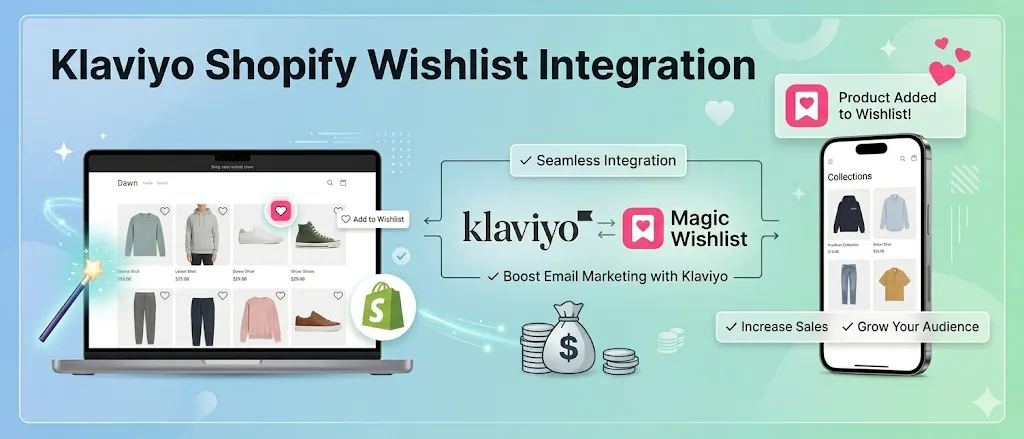
Klaviyo is the email tool most serious Shopify stores use. It is powerful, expensive, and only useful when you feed it the right data. A Shopify wishlist is one of the richest data sources you can plug in.
When a shopper saves an item, you get a clear signal: this person wants this product. That signal is gold for Klaviyo flows. The problem is most wishlist apps either do not talk to Klaviyo or charge extra for the integration.
This guide shows the full Klaviyo Shopify wishlist integration setup with Magic Wishlist, the free Shopify wishlist app. By the end, every wishlist activity from your store, including save, price drop, and back in stock, will flow into your Klaviyo account automatically. You will have three high-converting flows running by tomorrow.
Quick answer:
- Get your Klaviyo private API key from Settings → API Keys inside your Klaviyo account.
- Open Magic Wishlist’s Integrations page in Shopify admin and click Connect Klaviyo.
- Paste the API key and pick which wishlist activities to push.
- Build flows in Klaviyo using the new event types
Item Added to Wishlist,Price Drop, andBack in Stock.Total setup time: about three minutes. The integration is included free in Magic Wishlist with no usage caps.
What is Klaviyo Shopify wishlist integration?
Klaviyo Shopify wishlist integration is the live data connection between your Shopify wishlist app and your Klaviyo account. It does three things:
- Pushes wishlist activities (save, remove, price drop, back in stock) into Klaviyo as native events.
- Syncs wishlisted items with full product context (title, image, variant, price) for each event.
- Maps to existing profiles by shopper email, so wishlist activity attaches to the right person in Klaviyo automatically.
Once connected, Klaviyo can segment, trigger flows, and run personalized campaigns based on what shoppers actually saved, not just what they passively viewed.
Why Klaviyo + wishlist beats either one alone
Klaviyo on its own gets generic signals: page views, cart events, checkout abandons. It does not know which products a shopper is interested in but not ready to buy. That gap is where most lost sales hide.
A wishlist app fills the gap. Every save tells Klaviyo: this person wants this exact item. Now Klaviyo can:
- Segment shoppers by what they saved, not just what they viewed.
- Trigger flows based on wishlist activities, not just cart behavior.
- Personalize emails and SMS with the actual product, not a generic recommendation.
- Build personalized campaigns from wishlist segments for seasonal sends.
Stores that connect both see open rates of 25 to 40% on wishlist-triggered emails, far above the 18% benchmark for generic ecommerce sends. The reason is simple: a wishlist email is about something the shopper already said they want.
How Klaviyo Shopify wishlist integration works
The full data pipeline, end to end:
- Shopper acts on your store. Saves a wishlisted item, unhearts one, or sees a price drop on something they saved.
- Magic Wishlist captures the event. Server-side, with shopper email, variant, price, and timestamp.
- Event ships to Klaviyo. Through Klaviyo’s Events API, mapped to a typed event name like
Item Added to Wishlist. - Klaviyo matches the profile. Existing profile by email, or new profile if the shopper is a first-time guest.
- Flows fire. Any Klaviyo flow listening for that event runs, sending email, SMS, or both, with full product context available in the template.
This pipeline runs in real time. Most events land in Klaviyo within 60 seconds of the shopper action.
The 4 wishlist activities Magic Wishlist pushes to Klaviyo
When you connect Klaviyo, Magic Wishlist sends four event types to your Klaviyo account. Each event includes the shopper, the product, and the variant.
| Klaviyo event | Fires when |
|---|---|
Item Added to Wishlist | A shopper saves any product or variant |
Item Removed from Wishlist | A shopper unhearts a saved item |
Price Drop | A wishlisted item’s price decreases |
Back in Stock | A wishlisted item returns to inventory |
Every event payload includes the product title, image, URL, variant (size, color), price, and the shopper email and customer ID. That is everything you need to build flows, segments, and personalized campaigns.
Benefits of wishlist tracking for Shopify stores
The structural reason wishlist data is so valuable for Shopify + Klaviyo merchants:
| Benefit | What it unlocks |
|---|---|
| Higher-intent segments | Filter Klaviyo on shoppers with 3+ wishlist saves in 30 days. These are buyers, not browsers. |
| Variant-level personalization | Personalized campaigns built around the exact size and color the shopper saved, not a generic recommendation. |
| Cheaper customer retention | A wishlisted item recovery email costs nothing extra to send and converts at 4 to 8% on average. |
| Better attribution | See revenue from shoppers who saved an item, including guest checkouts that Klaviyo would otherwise miss. |
| SMS-eligible audiences | Wishlist activities can trigger SMS flows for high-LTV shoppers on Klaviyo’s email and SMS bundle. |
The net effect for most Shopify stores is a 10 to 25% lift in email-driven revenue within the first quarter after connecting wishlist data.
How to connect Klaviyo to Magic Wishlist
Total time: about three minutes.
Step 1: Get your Klaviyo private API key
- Log in to your Klaviyo account.
- Click your account icon (top right), then Settings → API Keys.
- Click Create Private API Key.
- Name it “Magic Wishlist”.
- Set the access scope to allow read and write on Profiles and Events.
Copy the key. It starts with pk_. Keep this tab open.
Step 2: Connect inside Magic Wishlist
- Open Magic Wishlist in your Shopify admin.
- Go to Integrations.
- Click Connect Klaviyo.
- Paste the API key.
- Click Save.
The connection is tested automatically. You will see a green checkmark when it is working.
Step 3: Pick wishlist activities to push
By default, all four events are on. You can turn any of them off. Most stores leave them all on. There is no downside, and Klaviyo only charges by profile count, not event count.
That is it. Wishlist activities on your store are now flowing into your Klaviyo account in real time. You can verify by going to Klaviyo’s Analytics → Custom Metrics and looking for Item Added to Wishlist. It will show events within a minute of your first test save.
The 3 Klaviyo flows to build first
Now the work moves into Klaviyo. Here are the three flows that pay back fastest. Each one uses wishlist activities as the trigger.
Flow 1: Saved but not bought (abandonment recovery)
Trigger: Item Added to Wishlist
Filter: Shopper has not placed an order containing the saved item in 24 hours.
Email 1 (sent at 24h): “Still thinking about it?” with the wishlisted item, image, price, and a soft CTA to buy.
Email 2 (sent at 72h): Light urgency. “Don’t miss out” with the same item and an optional unique discount code.
Optional SMS (at 96h): Same item, three-line message, deep-link to product page.
This flow alone recovers 4 to 8% of saved items into purchases on most stores. It is the highest-ROI personalized campaign you will build.
Flow 2: Price drop alert
Trigger: Price Drop
No filter needed.
Email: “Good news. The {{ product_title }} you saved just dropped to {{ new_price }}.” Image, CTA, done.
Optional SMS: Same message, two lines, deep-link.
Open rates on these regularly hit 35%+. Conversion is high because the trigger itself is the offer. Adding SMS on top of email lifts click-through by 8 to 12 percentage points for high-intent audiences.
Flow 3: Back in stock alert
Trigger: Back in Stock
No filter.
Email: “It’s back. The {{ product_title }} ({{ variant }}) you saved is in stock again. Quantities are limited.” CTA to product page.
Optional SMS: Critical for restock urgency. SMS lands within seconds, not minutes.
Back in stock emails are the fastest-converting in ecommerce. Often 20%+ click-through. The shopper already wanted it, so you are just telling them they can have it now. For a deeper look at this email type, see our Shopify back in stock notifications guide.
Email and SMS wishlist automation examples
Klaviyo supports email and SMS flows triggered from the same wishlist event. Here is how the strongest stores combine them:
| Wishlist activity | SMS | When to use both | |
|---|---|---|---|
| Item Added to Wishlist | Reminder at 24h | None (too early) | Email only |
| Price Drop | Send immediately | Send 1h later if no email open | Both for high-LTV |
| Back in Stock | Send immediately | Send immediately for limited-edition | Both for scarcity items |
| Abandonment Day 2 | Last reminder + discount | None | Email only |
Practical pattern for email and SMS combined personalized campaigns:
- Email is always-on. Send to every consented profile, every event.
- SMS is reserved for high-LTV and scarcity. Filter by lifetime spend > $200 OR product tag = “limited.”
- Stagger by 1 hour minimum. Avoid hammering the shopper. Email first, SMS if no open.
Stores that follow this pattern see SMS-driven revenue add 8 to 15% on top of email-only baselines, with minimal opt-out increase.
Building Klaviyo segments from wishlist data
Beyond flows, wishlist activities unlock segments you could not build before:
- High-intent shoppers: profiles with
Item Added to Wishlistevents >= 3 in the last 30 days. - Cart-abandoners with saved items: combine
Started Checkout(noPlaced Order) withItem Added to Wishlist. - Seasonal-interest shoppers: filter wishlisted items by collection or product tag.
- At-risk loyal customers: prior
Placed Order>= 2, but noItem Added to Wishlistevent in 60 days. Re-engagement campaign target. - Price-sensitive savers: shoppers who responded to
Price Dropevents historically. Tier them into a price-drop-only segment.
Each segment can feed campaigns or feed back into flows. The pattern works because wishlist activities tell Klaviyo what the shopper cares about, not just whether they engaged.
Using wishlist activities for personalized campaigns
Flows handle real-time triggers. Personalized campaigns handle scheduled sends with wishlist-aware content.
Three campaign patterns that use wishlist data:
- Wishlist roundup: A weekly or monthly email showing each shopper a summary of the items they saved, with current price and stock status. Open rates hit 50%+ because the content is uniquely about them.
- Curated drop announcement: When a new product launches, send only to shoppers who have wishlisted items in the same collection. Conversion runs 3 to 5x your standard product launch send.
- Seasonal restock teaser: Two weeks before a restock event, send a “your saved items are returning soon” email to shoppers with
Item Added to Wishlistevents on those SKUs.
These campaigns work because they are built from real wishlist intent signals, not demographics or guesses.
Best practices for wishlist reminder flows
Five rules that separate effective Klaviyo wishlist flows from annoying ones.
- Wait 24 hours before the first reminder. Earlier feels stalker-ish. Save volume drops on stores that send too soon.
- Cap the flow at three emails total. After three, the shopper has decided. More emails just train them to unsubscribe.
- Throttle per variant, not per product. A shopper who saved Size M and Size L should not get two separate price drop emails when both go on sale at the same time.
- Exit the flow on purchase. Add a “Has placed order with this variant” filter so the flow stops when the shopper finally buys.
- Test SMS sparingly. Reserve SMS for top-quartile-LTV shoppers and scarcity moments. Mass SMS sends drain goodwill fast.
Magic Wishlist throttles per variant by default and exits flows on purchase automatically. Your Klaviyo flows should mirror those rules for the same shopper coming from other event sources.
Common Klaviyo wishlist integration mistakes to avoid
The flows above are simple. The ways stores break them are simple too.
Mistake 1: Sending the same product alert twice. If a shopper saves an item, the price drops, the back in stock event fires, and you do not throttle, they get hammered. Magic Wishlist throttles per-variant by default. Verify your Klaviyo flow filters do the same.
Mistake 2: Generic copy on the price drop email. The trigger is the offer. Do not bury the price in paragraph three. Subject line: include the new price. Body: lead with the price.
Mistake 3: Not filtering customers who already bought. Add a filter to the saved-but-not-bought flow that excludes anyone who placed an order containing the saved variant. Magic Wishlist sends order events that Klaviyo can read for this filter.
Mistake 4: Forgetting consent on SMS flows. Wishlist email events fire on all profiles. SMS only fires on profiles with explicit SMS consent. Make sure your wishlist signup form collects SMS consent if you plan to send SMS reminders.
Mistake 5: No exit condition on personalized campaigns. Wishlist segments grow. Without an exit (“Placed Order with this variant”), the same campaign keeps sending after the shopper buys. Always add the purchase-exit filter.
Stop running Klaviyo blind
Klaviyo without wishlist data is missing the strongest signal of intent your shoppers give you. Plug it in once, and three of the highest-ROI flows you will ever build are running by tomorrow.
Install Magic Wishlist free and connect Klaviyo in three minutes. Free forever, every wishlist activity included, email and SMS flow support out of the box.