Fashion shoppers do not buy on the first visit. They browse, save items mentally, leave, come back, leave again, and finally check out, sometimes weeks later. The path to purchase for clothing is messy.
A Shopify wishlist for fashion stores turns that mess into a tracked recovery channel. Every save becomes a follow-up opportunity: when the price drops, when the size restocks, when the shopper drifts back to compare options. For fashion stores, this is the single highest-ROI feature most do not have yet.
This guide is for fashion merchants on Shopify covering apparel, footwear, accessories, jewelry, and anything where size, color, or style matters. We cover three things:
- Why fashion stores need a Shopify wishlist more than other niches.
- How to add a wishlist in one minute on the free plan.
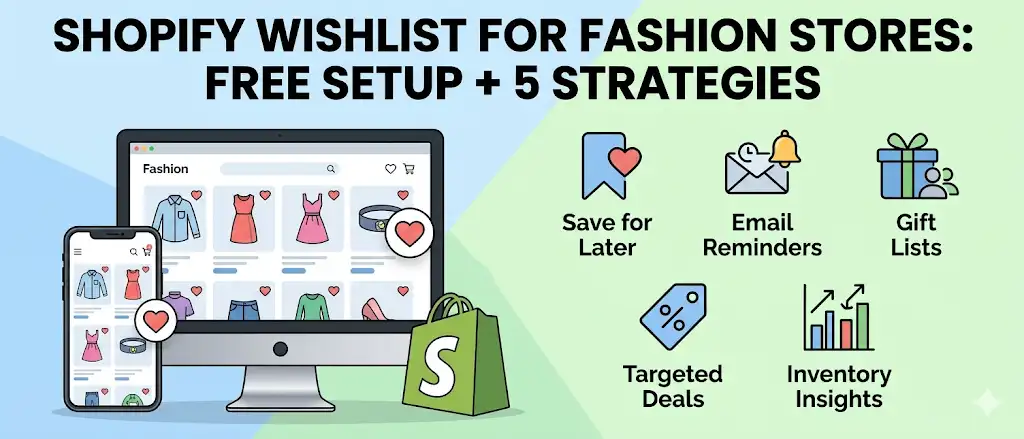
- The five strategies that move revenue most.
Quick answer: Fashion shoppers visit a store an average of 3 to 5 times before buying. Most never return after the first visit. A free Shopify wishlist app like Magic Wishlist saves the exact size and color a shopper picked. It then emails them when the price drops or stock returns. The free plan setup takes one minute and works with any Online Store 2.0 theme.
What is a Shopify wishlist for fashion stores?
A Shopify wishlist for fashion stores is a save-and-track feature with two parts. First, it lets shoppers create a wishlist of products with the exact variant they picked (size, color, length, fit). Second, it lets the store follow up with automated emails when prices drop, items restock, or shoppers abandon the save.
It does three things specifically tuned for fashion ecommerce:
- Variant-level saving. The wishlist remembers Size M Blue, not just the parent product. Recovery emails fire on the exact variant.
- Customer accounts and guest checkout in one. Shoppers save products without creating customer accounts. Guest wishlists merge into customer accounts automatically when the shopper later signs in.
- Share wishlists. Read-only share URLs turn personal wishlists into gift requests, driving organic traffic during birthdays, weddings, and holidays.
A wishlist app like Magic Wishlist on a free plan delivers all three out of the box. The recovery email pipeline fires the right message at the right moment.
Why fashion stores need a Shopify wishlist
Three patterns make fashion uniquely suited for wishlists:
- Multi-visit purchase decisions. Fashion is rarely impulse. Shoppers compare prices, check reviews, ask friends, wait for sales.
- Variant complexity. Sizes, colors, lengths, fits. A shopper is not saving “the jacket”. They are saving “the jacket in size M, dark wash.”
- Seasonal and price-sensitive demand. Fashion shoppers wait for sales and watch for restocks. A wishlist with alerts puts your store back in front of them at exactly the right moments.
Without a wishlist, multi-visit shoppers have to find the product again every visit, and most do not bother. Generic save buttons that do not track variants give shoppers a useless list. And price-sensitive shoppers leave because nothing brings them back when the sale finally lands.
If your store sells products people consider for more than ten minutes, a wishlist captures revenue you are currently losing.
How wishlist buttons improve fashion ecommerce UX
Wishlist buttons are the entry point. Bad placement kills save volume. Good placement makes saving feel automatic.
Three rules for wishlist buttons on fashion stores:
| Placement | Why it matters |
|---|---|
| Product card (collection grid) | Shoppers can save products without clicking through. Save volume is 2-3x higher with collection-grid buttons. |
| Product page (next to title) | Shoppers committed enough to click in expect a one-tap save. |
| Search results | Capture shoppers who are still in browsing mode. |
The heart icon is the universal convention. Outlined when not saved, filled when saved. Anything more complex confuses shoppers. Magic Wishlist places wishlist buttons in all three positions automatically with no theme code editing.
Benefits of allowing customers to save products
Letting shoppers save products is the lowest-friction conversion lever in fashion ecommerce. The benefits compound.
| Benefit | Outcome |
|---|---|
| Captures multi-visit shoppers | A shopper who would have left now leaves a trail your store can follow up on. |
| Turns interest into recoverable leads | Every save is a data point you can email against. |
| Surfaces top saved items | Your dashboard shows which variants have the most pent-up demand, so you restock the right SKUs first. |
| Personalizes future campaigns | Klaviyo campaigns segmented by wishlisted items convert 3-5x higher than generic sends. |
| Drives gifting traffic | When shoppers share wishlists, friends and family arrive with high purchase intent. |
| Strengthens customer accounts | Shoppers who save have a reason to log back in. Customer account engagement rises. |
The net effect for fashion stores: 10-20% lift in email-driven revenue within a quarter of installing wishlist functionality.
Using customer accounts for wishlist personalization
The wishlist sits at the intersection of guest behavior and logged-in customer accounts. Done right, it personalizes the entire return-visit experience.
The flow:
- Guest shopper saves products. Wishlist stores in a first-party cookie. No friction.
- Shopper returns and signs in. Magic Wishlist auto-merges the guest wishlist into the customer account.
- Customer accounts now carry intent history. The store knows what they wanted to buy but did not.
- Future campaigns get personalized. Klaviyo segments built from wishlisted items send to the right person at the right moment.
- Top saved items inform homepage personalization. Returning customers see the products closest to their interest first.
Customer accounts without wishlist data are demographic shells. Customer accounts with wishlist data are intent profiles. The difference shows up in conversion rates within a few weeks.
How wishlists help boost sales for fashion stores
Wishlists boost sales through four mechanisms, each compounding the others.
Mechanism 1: Recovery emails on the exact variant
The shopper saves Size M Blue. The variant restocks. The email fires. Click-through is 20%+ because the trigger is the offer. Conversion is high because the shopper already decided weeks ago. The email just removes the obstacle.
Mechanism 2: Price drop alerts on saved items
Fashion shoppers wait for sales. A price drop on a saved item is the most relevant marketing message you can send. Open rates regularly hit 35%+. Conversion runs 8-15% during sale periods.
Mechanism 3: Top saved restock prioritization
Your top saved list tells you which variants have the most pent-up demand. Restocking the top saved items first means revenue lands faster and your shoppers see your store as responsive.
Mechanism 4: Share-driven organic traffic
Fashion is one of the most-gifted categories on Shopify. Shoppers who share wishlists send their personal landing page to friends and family. That is some of the highest-intent traffic you can get, and it costs nothing.
Stores running all four mechanisms typically see fashion ecommerce revenue lift 10-20% in the first quarter, with continued compounding as the wishlist database grows.
5 fashion-specific use cases for a wishlist
These are the patterns we see across hundreds of fashion stores using a Shopify wishlist.
1. The save my size play
A shopper finds a dress they love. The size they need is sold out. Without a wishlist, they leave and forget your store exists. With a wishlist, they save the exact variant. When you restock that size, the back-in-stock email fires automatically. Conversion on these emails is regularly 20%+.
This is the single highest-impact use case for fashion stores. If you do nothing else with a wishlist, set up variant-level back-in-stock alerts.
2. The wait for the sale play
Fashion shoppers know seasonal sales are coming. They save items they like and wait. A wishlist with price drop alerts means the moment that item goes 20% off, they get an email, and most click straight through to buy.
Stores running this play see 8-15% of saved items convert during sale periods, versus 2-4% without alerts.
3. The gift wishlist
Birthdays, weddings, holidays. Fashion is one of the most-gifted categories on Shopify. Share wishlists let a shopper send their saved items to a partner, family member, or friend group. Friends and family buy directly. You get organic referral traffic.
This is free word-of-mouth. The cost is one share button. The lift on gifting season revenue is substantial for stores that turn it on.
4. The lookbook builder
Higher-end fashion shoppers curate. They build outfits, save coordinated pieces, and come back to mix and match. A wishlist with multi-list support becomes a personal lookbook. The longer they spend curating, the more committed they become to buying.
5. The abandoned-fitting-room recovery
Online fashion is full of near-purchases. Shoppers add to cart, then bail because they are not 100% sure on size or fit. A wishlist captures that hesitation. Send a 24h reminder with a unique discount code, and 4-8% come back to convert.
Variant-level saving: the feature that decides whether your wishlist works
Most fashion shoppers care about one thing: did the wishlist remember the size they picked?
If a shopper saves Linen Jacket, Size M, Blue, your back-in-stock email needs to fire only when Size M Blue restocks. Not Size L Blue. Not Size M Black. The exact variant.
This is non-negotiable for fashion. Older or cheaper wishlist apps only track at the product level. The result: shoppers get “back in stock!” emails for sizes they do not wear. Trust dies fast.
Magic Wishlist tracks variants by default. Every save is variant-specific. Every alert fires on the exact variant.
How to add a wishlist to your Shopify fashion store (1 minute)
Total time: 1 minute.
Step 1: Install Magic Wishlist
Go to the Shopify App Store and click Add app. Approve permissions. Done in thirty seconds. Magic Wishlist is on a free plan, no credit card required.
Step 2: Match your brand
Open Branding in the Magic Wishlist dashboard. Set:
- Primary color: your brand color, copied from your theme settings.
- Icon style: outlined or filled hearts work for most fashion brands; some pick custom SVGs.
- Display mode: drawer for desktop, full page for mobile-heavy stores.
Use Live preview to see how the wishlist buttons look on your product cards. Most fashion stores want them small and subtle, top-right of the product image.
Step 3: Turn on all four recovery emails
In Emails, switch on:
- Abandonment reminder (with personal discount code).
- Price drop alert.
- Low stock alert.
- Back in stock alert.
For fashion, the order of importance is: back-in-stock > price drop > abandonment > low stock. All four together cost you nothing on the free plan and cover every recovery moment.
Step 4: Enable share wishlists
Open Sharing. Turn on link sharing, email, WhatsApp, and social. This is the gifting unlock. For fashion stores, sharing becomes a meaningful organic traffic source during birthdays and holidays.
Step 5: Connect your email tool
If you use Klaviyo or another tool, connect it from Integrations. Wishlist events flow into your existing flows so you can build segments and personalized campaigns. See the Klaviyo Shopify wishlist integration guide for the full setup.
Wishlist email copy for fashion brands
The trigger does the heavy lifting in fashion recovery emails. Do not over-design the body.
Subject line. Lead with the product name. Do not add adjectives.
- ✅ “Your size is back: Linen Jacket”
- ❌ “GUESS WHAT?? 🎉 Your fav linen jacket is BACK!!”
The shopper recognizes the product name. That is the click hook. Emojis and exclamation points add nothing.
Body image. Full-bleed product image at the top. Real photography, not a flat-lay studio shot. The shopper saved this exact look. Show it.
Variant detail. Always confirm the size and color. “The Size M Blue you saved is back.” Specific equals trust.
CTA. Single button. “Buy now” or “Shop {{ product }}.” Do not add secondary links to the homepage or other products. Single decision, single button.
Urgency. Use real scarcity. “Only 4 left in your size” works. “LIMITED TIME!!!” does not.
For full templates by alert type, see our Shopify wishlist recovery email templates.
Best practices for wishlist functionality in fashion ecommerce
Six rules that separate effective fashion store wishlists from forgotten ones.
- Place wishlist buttons on product cards. Save volume is 2-3x higher with collection-grid wishlist buttons than with product-page-only placement.
- Allow guests to save products. Forcing customer accounts before save drops conversion 70-80%. Use guest wishlists; merge them into customer accounts on sign-in.
- Track variants, not just products. Fashion shoppers care about size and color. A wishlist that only saves the parent product is broken for fashion.
- Turn on all four recovery emails. Back-in-stock, price drop, low stock, and abandonment. They cover different shopper moments and do not cannibalize each other.
- Surface top saved items in your dashboard. Use the list to prioritize restocks, plan campaigns, and feature high-intent products on your homepage.
- Make share wishlists one tap. Fashion is gifted. Wishlists that share well bring organic traffic during gifting seasons.
Magic Wishlist follows all six by default. Other wishlist apps may require manual configuration or paid tier upgrades to match.
Common wishlist mistakes fashion stores make
Three common mistakes worth avoiding.
Mistake 1: Forcing customer accounts before save. “Sign up to save items” kills wishlist usage. Fashion shoppers especially will not create customer accounts to save a maybe-purchase. Use guest wishlists. They merge into customer accounts automatically when the shopper buys.
Mistake 2: Hiding the wishlist button in the menu. Wishlist buttons should be on the product card and on the product page. If shoppers have to click into a product to save it, save volume drops by half.
Mistake 3: Ignoring share wishlists. Fashion is gifted. Wishlists that share well bring organic traffic during gifting seasons. If your wishlist app does not make sharing one tap, you are leaving gifting revenue on the table.
Mistake 4: Not acting on top saved data. Your top saved list tells you which variants have the most pent-up demand. Ignoring it means you restock at random while your most-wanted sizes stay out of stock.
Mistake 5: Charging shoppers (or yourself) for variant saving. Variant-level saving should be the baseline, included on every wishlist app’s free plan. Apps that put variant saving behind a paid tier are using the most important feature as a hostage.
Fashion stores need wishlists more than any other niche
Multi-visit decisions, variant complexity, and price-sensitivity are the three patterns that define fashion ecommerce. A wishlist captures all three. The shoppers who would have left without buying become recoverable. The customer accounts who already bought come back for the next saved item. The friends and family who receive shared wishlists arrive with intent.
Add a wishlist to your Shopify fashion store today. The free plan covers everything. Setup is one minute.
Install Magic Wishlist free. Your first variant save can happen in one minute.